Call Quick Guide
Dial a number: Go to Calls à Enter number/name in the dial pad Click Call
Place a call on hold: Select Hold at the top of your call window.
Resume call: Continue call by selecting Resume.
Consult then transfer: Select Transfer at top of call window
Consult then transfer Enter name/number and select
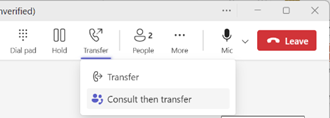
When ready, click on Transfer (highlighted in yellow).

Direct transfer:
- Select Transfer at top of call window
- Transfer Select ‘Ring back’ option
- Enter name/number
- Transfer.
Call Script
Answering Calls: “Good morning/afternoon NCUK [first name] speaking, how can I help?”
Placing Calls on Hold: “Is it alright if I put you on hold for a moment to look into that?”
Resume call: “Thanks for holding.”
Transfer: “I'm going to transfer you to name/my colleague in (department), who will be able to assist you further with this issue.”
Hunt Groups Number
|
Hunt Groups |
Telephone Number |
|
Head Office Number |
03303413290 |
|
HR |
03303413931 |
|
Legal |
03303413932 |
|
IT |
03303413297 |
|
Placement (MEA) |
03303413934 |
|
Placement (Asia) |
03303413935 |
|
Placement (UK & ROW) |
03303413936 |
|
Placement (China) |
03303413937 |
|
University Partnerships |
03303413938 |
|
UPP Senior Team |
03303413940 |
|
BD Team |
03303413942 |